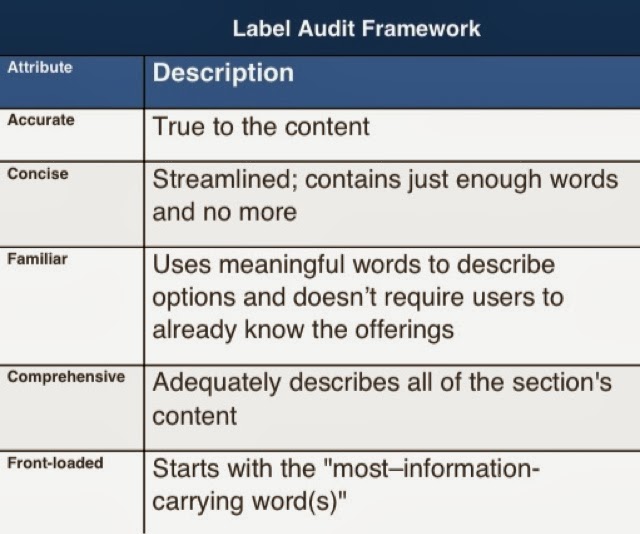
(from Four Dangerous Navigation Approaches that Can Increase Cognitive Strain).
Showing posts with label web coding. Show all posts
Showing posts with label web coding. Show all posts
Monday, September 30, 2013


Thursday, June 6, 2013
Validate Open Graph Code for Twitter, Facebook and Google+
Using these two validators will allow you to have a fairly good idea if sharing is going to be made more pretty on both Faceboook and Twitter:
Wednesday, March 13, 2013
Speed Matters Even More
I wrote some time ago that the speed a web page loads matters, and now it matters even more as people use the Internet from phones, tablets and other devices that don't always have true high-speed access, nor do users have patience when on the go. Here are some numbers to underscore the need for speed:
Adding half a second to a search results page can decrease traffic and ad revenues by 20 percent, according to a Google study. The same article reports Amazon found that every additional 100 milliseconds of load time decreased sales by 1 percent. Users expect pages to load in two seconds - and after three seconds, up to 40 percent will simply leave
(from Improving UX Through Front-End Performance). As I've said to classes and clients: no one has ever said "this website loads too fast," so hurry it up.
Wednesday, January 23, 2013
Preliminary Best Practices for All Web Sites
All Sites Should:
(in the following, www.example.com should be replaced with the official domain name of the site)
Have an Official Address
The site should have a single, official address: its canonical URL.
The canonical URL that the site is at should be what business uses on postcards, business cards and everything in the world, both online and offline. All of a site's various URLs or other spellings, should permanently redirect, using a 301 redirect header, to its canonical URL. Even http://example.com should use a permanent redirect, using a 301 redirect header, to http://www.example.com.
Many systems assume the www will be at the beginning of the canonical URL, but if http://example.com must be used as the canonical URL, then http://www.example.com should 301 redirect to http://example.com.
Tell Robots Where Their Map Is and What to Ignore
To help machines and robots know what to index and allow machines to automatically discover the xml sitemaps, there should be a robots.txt file at the root level, publically viewable at http://www.example.com/robots.txt.
To allow everything on the site to be indexed, the robots.txt file should contain:
User-agent: *
Disallow:
sitemap: http://www.example.com/sitemap.xml
Before upload, robots.txt files can be validated with free online tools like http://tool.motoricerca.info/robots-checker.phtml.
Wednesday, March 14, 2012
Mobile Devices Overtaking PCs for Accessing Web
With current growth rates, web access by people on the move - via laptops and smart mobile devices - is likely to exceed web access from desktop computers within the next five years.
From an International Telecommunication Union press release from June 2010. There are some that say ...in the next 18–24 months, mobile devices will overtake PCs as the most popular way to access the web
and vitally point out the need to stop treating the mobile web as a separate thing.
Sunday, April 24, 2011
To Use a CDN for JavaScript or Not
If we use Google’s JavaScript Library CDN, we are asking the majority of our website visitors (who don’t have jQuery already cached) to take a 1/3 of a second penalty (the time to connection to Google’s CDN) to potentially save a minority of our website visitors (those who do have a cached copy of jQuery) 1/3 of a second (the length of time to download jQuery 1.3.2 over a 768kps connection). That does not make sense
Tuesday, March 15, 2011
Every Good Site
Websites differ, but every great website is:
- clear in its purpose,
- written well,
- always available and fast,
- well coded,
- timed well including going live early and announcing late,
- and avoids other unexpected pitfalls.
Web Site Purpose
A web site can allow people to:
- Learn information
- Buy something
- Be sent to another site
- Give you permission communicate with them
- Tell other people about something
- Do something offline
- Be entertained
If you are trying to do something else with a web site, you may not succeed.
Wednesday, March 31, 2010
Tuesday, October 6, 2009
Valid HTML Code is Better Than Invalid Code
Valid HTML code will look better more places, function as designed more often and be well liked by things like search engines. The W3C Markup Validation Service is a good one since they are the organization that maintains the specifications.
Sunday, September 27, 2009
Badge for Your Site Your Visitors Can Use on Their Sites
How to make a "badge" available to others who like it and want to display it on their sites/blogs.
- upload the badge so it can be accessed by everyone on the internet
- create code that people can use to use the badge on their sites, like this:
<a href="http://www.example.com/"><img src="http://www.example.com/badge.gif" alt="a badge"/></a>where example.com is your site, and the "a badge" is a short text alternative text describing the badge for those who do not load or see the image - tell the people who want to use the badge about the code
Tuesday, September 22, 2009
Conditional Comments in Internet Explorer
Conditional comments allow you to have one block of code for some versions of IE and a different block of code for everything else. I've found that IE 5.2 for mac, for instance, does not support conditional comments, but IE 5 through IE 7 on windows seem to support conditional comments.
This code loaded in a browser will tell you whether or not it supports conditional comments:
<!--[if IE]><p>You are using an Internet Explorer that supports conditional comments.</p><![endif]-->
<![if !IE]><p>You are not using an Internet Explorer that supports conditional comments.</p><![endif]>
I recommend using it on live sites sparingly.
Saturday, August 29, 2009
Redirecting Web Pages Using PHP
You can redirect the root level of your site http://www.example.com/ to a lower level webpage like http://www.example.com/directory1/directory2/filename.html ) in many ways.
One way to make such a redirection, if you have a Linux hosting plan with GoDaddy, is to make a text file named "index.php" and have the file contain:
<?php
//Redirect browser
header("Location: http://www.example.com/directory1/directory2/filename.html");
?>
Place it in the root of the "web/" directory in your hosting space and, barring a lot of complex configuration changes that may have been made previously, it should gentle redirect web visitors from http://www.example.com/ to http://www.example.com/directory1/directory2/filename.html .
Wednesday, March 4, 2009
Canonical Link Element
There is a Google Webmaster Central blog post about the presentation about canonical link elements made at SMX West and talked through in a video:
Wednesday, August 27, 2008
Twitter With Full URLs
When twittering, or otherwise posting a URL online, putting the http://www prefix on the web address will automatically be recognized as a URL and be made a link by various systems (e.g., Google's spiders, twitter's web interface, tweetie, etc.).
Facebook, for instance, automatically recognizes a full URL and makes it a link almost everywhere, and includes the page description and image in messages and wall posts. You can customize the default image, title and description that Facebook sharing uses too.
Thursday, August 7, 2008
Top 6 Online Writing Tips
Online writing is different than print writing. Make writing for the internet concise, clear and actionable. Readers prefer short articles that help them get something done; readers don't read the whole text online (only 20-28% of an online writing is actually read).
There are six key ways to write for the internet:
Online Writing - Acronyms And Abbreviations Need Mark-Up
SEO and accessibility benefit when the meaning of acronyms and abbreviations are clearly spelled out. Instead of leaving search engines to guess which meaning of an acronym you intend, tell them. Using HTML to identify acronyms and abbreviations makes pages more accessible to non-visual browsers as well.
Google indexes acronyms more effectively when they are marked-up properly; Some say they use the acronym tag ...frequently and I have a page that responds to a keyword that only appears in the title attribute.
Even more vital is identifying acronyms and abbreviations when they have many different meanings. For instance "NASA" is both the National Aeronautics and Space Administration and the National Auto Sport Association, or "LA" in the following:
I have a friend from New Orleans, LA who now lives in LA. Which is marked-up with this syntax:
I have a friend from New Orleans, <abbr title="Louisiana">LA</abbr> who now lives in <acronym title="Los Angeles">LA</acronym>. In all cases making the meaning of acronyms and abbreviations clear makes for clear online writing.
This is part 5 of Top 6 Online Writing Tips
Read parts 1 2 3 4 5 6
Monday, August 4, 2008
Atom verses RSS Feeds
The Case for Atom
Embracing Atom now gives you broad compatibility with any standards based system, and in the future should keep your feeds adaptable and compatible with future technologies and tools.
Feeds in the Atom Syndication Format (atom 1.0) will have the widest possible uses, compatibility and longevity of any current syndication feed format. Atom is already a widely supported syndication format, and in the future a full-fledged protocol, that is already in development, ...for using XML (Extensible Markup Language) and HTTP (HyperText Transport Protocol) to edit content... an application-level protocol for publishing and editing Web resources belonging to periodically updated websites
(from
The Atom Publishing Protocol Memo).
Video Intro to the Atom Publishing Protocol (AtomPub):
RFC5023 details the Atom Publishing Protocol.
Atom, not RSS
[Atom has] been through a standardization process organized by an international standards body and there is an RFC that describes exactly what an Atom feed is and how you should parse it.
RSS is only "standard" in the sense that there are lots of people using various flavors of XML that claim to be RSS. There isn't even agreement as to who "owns" RSS 2.0 - Dave says he does, and the RSS Working Group says they do. Now there are 2 versions of the same "standard" floating around
(from Jason Lefkowitz's comment on technologyevangelist.com).
Saturday, July 12, 2008
Support iPhone with YouTube Videos
You should be supporting iPhones with the YouTube videos on your web site. Link to the YouTube video page as a standard link, don't only embed it. iPhones have a YouTube application that will be launched by a link on a web page to the YouTube video page, but iPhones don't yet support flash, so they can't display the embedded videos right on the page in Safari, yet.
Including the link with also help search engine crawlers find the videos and better understand what is on your web site. Here's an example of how to support the iPhone when embedding YouTube Videos.
Wednesday, July 9, 2008
Yahoo Opened Their Search Technology to Third Parties
BOSS allows developers to submit queries (and their associated parameters) via an API to retrieve up to 50 web, image, news, or spelling results in XML or JSON format at a time
(from TechCrunch).
Subscribe to:
Posts (Atom)