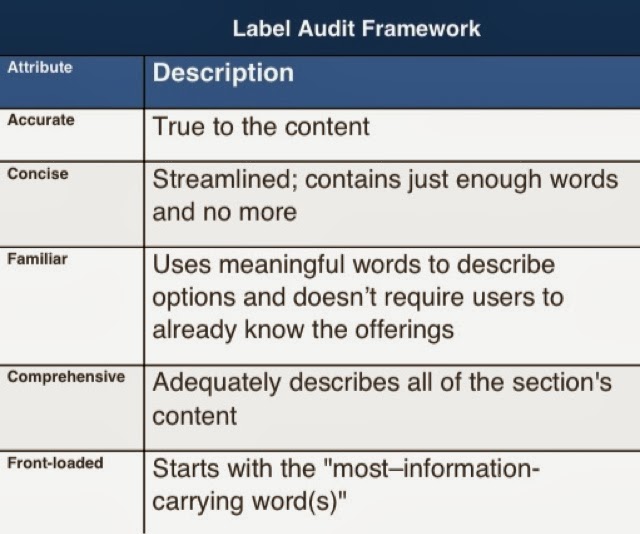
(from Four Dangerous Navigation Approaches that Can Increase Cognitive Strain).
Showing posts with label web design. Show all posts
Showing posts with label web design. Show all posts
Monday, September 30, 2013


Thursday, June 6, 2013
Validate Open Graph Code for Twitter, Facebook and Google+
Using these two validators will allow you to have a fairly good idea if sharing is going to be made more pretty on both Faceboook and Twitter:
Wednesday, March 13, 2013
Speed Matters Even More
I wrote some time ago that the speed a web page loads matters, and now it matters even more as people use the Internet from phones, tablets and other devices that don't always have true high-speed access, nor do users have patience when on the go. Here are some numbers to underscore the need for speed:
Adding half a second to a search results page can decrease traffic and ad revenues by 20 percent, according to a Google study. The same article reports Amazon found that every additional 100 milliseconds of load time decreased sales by 1 percent. Users expect pages to load in two seconds - and after three seconds, up to 40 percent will simply leave
(from Improving UX Through Front-End Performance). As I've said to classes and clients: no one has ever said "this website loads too fast," so hurry it up.
Wednesday, January 23, 2013
Preliminary Best Practices for All Web Sites
All Sites Should:
(in the following, www.example.com should be replaced with the official domain name of the site)
Have an Official Address
The site should have a single, official address: its canonical URL.
The canonical URL that the site is at should be what business uses on postcards, business cards and everything in the world, both online and offline. All of a site's various URLs or other spellings, should permanently redirect, using a 301 redirect header, to its canonical URL. Even http://example.com should use a permanent redirect, using a 301 redirect header, to http://www.example.com.
Many systems assume the www will be at the beginning of the canonical URL, but if http://example.com must be used as the canonical URL, then http://www.example.com should 301 redirect to http://example.com.
Tell Robots Where Their Map Is and What to Ignore
To help machines and robots know what to index and allow machines to automatically discover the xml sitemaps, there should be a robots.txt file at the root level, publically viewable at http://www.example.com/robots.txt.
To allow everything on the site to be indexed, the robots.txt file should contain:
User-agent: *
Disallow:
sitemap: http://www.example.com/sitemap.xml
Before upload, robots.txt files can be validated with free online tools like http://tool.motoricerca.info/robots-checker.phtml.
Wednesday, March 14, 2012
Mobile Devices Overtaking PCs for Accessing Web
With current growth rates, web access by people on the move - via laptops and smart mobile devices - is likely to exceed web access from desktop computers within the next five years.
From an International Telecommunication Union press release from June 2010. There are some that say ...in the next 18–24 months, mobile devices will overtake PCs as the most popular way to access the web
and vitally point out the need to stop treating the mobile web as a separate thing.
Tuesday, March 15, 2011
Every Good Site
Websites differ, but every great website is:
- clear in its purpose,
- written well,
- always available and fast,
- well coded,
- timed well including going live early and announcing late,
- and avoids other unexpected pitfalls.
Web Site Purpose
A web site can allow people to:
- Learn information
- Buy something
- Be sent to another site
- Give you permission communicate with them
- Tell other people about something
- Do something offline
- Be entertained
If you are trying to do something else with a web site, you may not succeed.
Thursday, August 7, 2008
Top 6 Online Writing Tips
Online writing is different than print writing. Make writing for the internet concise, clear and actionable. Readers prefer short articles that help them get something done; readers don't read the whole text online (only 20-28% of an online writing is actually read).
There are six key ways to write for the internet:
Online Writing - Scan-Ability Is Readability Online
Users scan more than read online, and they scan in an F-shaped pattern. This is a heat map of where readers' eyes look while reading online (red areas are most viewed areas, yellow next most, blue least most viewed; click image to enlarge):

(from Jakob Nielsen's excellent article on Banner Blindness).
Readers scan the first sentences of paragraphs to decide whether to read the rest of the paragraph or not. The first sentence should describe the paragraph, giving readers clues as to whether the rest of the paragraph will interest them. The first two words of each paragraph should be the most information-carrying words.
Even deeply interested and engaged visitors often do not read all of an article's text as the first 30 seconds of this video show:
This is part 1 of Top 6 Online Writing Tips
Read parts 1 2 3 4 5 6
Online Writing - Titles, Subjects And Headings Need Inverted Pyramid Extreme
Titles, headlines and subheadings all need the most meaningful and significant information first, toward the beginning. Many forms of content are often viewed out of context and in contexts outside the publisher's control:
- titles
- subject lines
- headlines
Microcontent must have an even more exaggerated inverted pyramid style than the larger content they designate; the first word or two should be the most important and meaning imbued words in titles, headlines and subjects.
There has also been some interesting discussion about the use of numbers in headlines.
This is part 3 of Top 6 Online Writing Tips
Read parts 1 2 3 4 5 6
Online Writing - Numerals Are Better In Online Writing
For numbers, use digits, not words, online. Users can more easily read and understand these:
- 24 Reasons Why Marshmallows Are Awesome
- There are 50 states in the United States.
- On August 1, 2008 at 6:18:22 PM GMT the US national debt was about $9,535,720,238,424.97.
Than these:
- Twenty-Four Reasons Why Marshmallows Are Awesome
- There are fifty states in the United States.
- On August first two-thousand eight at six eighteen and twenty-two seconds in the evening, GMT the US national debt was about nine trillion, five hundred thirty five billion, seven hundred twenty million, two hundred thirty eight thousand, four hundred twenty-four dollars and ninety seven cents.
Numerals are more scannable than words.
This is part 6 of Top 6 Online Writing Tips
Read parts 1 2 3 4 5 6
Wednesday, July 9, 2008
Web Design in Different Browsers
Sometimes it's useful to see a website in many browsers to be sure the design looks good to all of the site's visitors. Short of installing many different browsers on different computers, there are some websites that can help.
Saturday, January 5, 2008
Keyword Research & Suggestion Tools
The Google Adwords Keyword Tool can tell you advertiser competition and search volume for a keyword and its synonyms. There is an interesting round-up of tools for choosing keywords on seobook.com.
Tuesday, November 6, 2007
Cheating Color
In a web page design, cheating colors is a way to make colors appear to be the same, when in fact they are different. Depending on context (e.g., background, surroundings, etc.) a color may _appear_ different when in fact it is the same as another area on a web page.
For instance, a light color on a light background may look slightly lighter when it is a small area (e.g., small text) than it does in a large area (e.g., header text). Making the smaller area actually darker, can make the two different areas appear to be the same color.
Similarly, but in reverse, a dark color on a dark background may look better if lightened in small areas relative to bigger areas.
For instance, a light color on a light background may look slightly lighter when it is a small area (e.g., small text) than it does in a large area (e.g., header text). Making the smaller area actually darker, can make the two different areas appear to be the same color.
Similarly, but in reverse, a dark color on a dark background may look better if lightened in small areas relative to bigger areas.
Monday, October 29, 2007
Monday, October 22, 2007
Monday, April 16, 2007
Color Palette Generator
This tool makes a color palette out of any image on the web. It can be very useful if you're trying to match a web site to an image you are using on the site.
Friday, March 2, 2007
VisiBone Webmaster's Color Lab
You can test out web-safe colors to develop a color scheme that will look the same on different browsers and platforms.
Subscribe to:
Posts (Atom)