
(click to expand). Often used to tie one's harness to the climbing rope. A video on how to tie a figure eight knot.
Showing posts with label tips. Show all posts
Showing posts with label tips. Show all posts
Monday, March 12, 2012
Figure 8 Follow Through


Monday, October 24, 2011
Get Found: Lecture at USC Business School
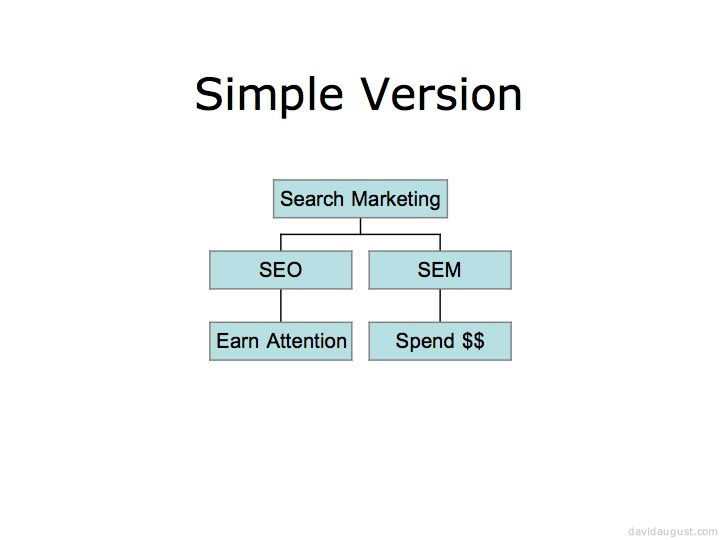
I'm guest lecturing at USC's business school tomorrow. Here's a sneak peak at 2 slides from my lecture "Improve the World → Make Things Findable" (they make more sense in the context of my whole presentation).

Sites I Cite:
http://davaug.com/befast
http://davaug.com/uptimematters
http://davaug.com/deadpagerank
http://davaug.com/write4search
http://davaug.com/filterbub
Friday, March 18, 2011
How to Secure Your Twitter
Twitter has added the option to encrypt your connection to their site, to always use https. Here's how:
- Go into twitter account settings
- scroll down
- near the bottom click the checkbox next to "Always use HTTPS."
- click save

If you ...often surf the Web in public places - such as a school campus, workplace or local coffee shop
then this will help you stay a little more protected while you tweet (thanks to the LA Times for the heads up).
Tuesday, March 15, 2011
Every Good Site
Websites differ, but every great website is:
- clear in its purpose,
- written well,
- always available and fast,
- well coded,
- timed well including going live early and announcing late,
- and avoids other unexpected pitfalls.
Web Site Purpose
A web site can allow people to:
- Learn information
- Buy something
- Be sent to another site
- Give you permission communicate with them
- Tell other people about something
- Do something offline
- Be entertained
If you are trying to do something else with a web site, you may not succeed.
Wednesday, March 31, 2010
Friday, January 15, 2010
Compressing Video File Size
These two sites have been recommended to me to reduce file size media-convert.com and zamzar.com. Sometimes that's necessary to upload video to some web sites.
Wednesday, November 11, 2009
How to Make Any Page Your Homepage
How to make example.com your starting page (these instructions were written about 5 years ago and may be too old for some systems).
Netscape 4.0-6.0
- Select "Preferences" from the "Edit" menu.
- Click on "Navigator."
- In the "Navigator Starts with" section, select "Home page."
- In the "Home page" section, type "
http://www.example.com/" in the text box. - Click "OK."
Internet Explorer
- Select "Internet Options" from the "Tools" menu.
- Click on the "General" tab.
- In the "Home page" section, type "
http://www.example.com/" in the text box. - Click "OK."
America Online
- Make sure you are on the page,
http://www.example.com/. - Click the link below with your right mouse button and select "Copy URL to Clipboard." (If the "copy" option didn't appear, highlight the following address: "
http://www.example.com/" then go to the "Members" drop down menu and select "Preferences") - Click on the "WWW" icon.
- Click on the "Home Page" box at the bottom of the pop-up window and then depress your "Control" and "V" keys (at the same time) and paste in the address. If the address does not appear in the box, simply type in what you tried to paste from above.
- Click the "OK" button.
Internet Config (some Mac OS configurations)
- Open the "Internet" control panel (in the "Control Panels" folder in your "System Folder").
- Select the set for which you want to change the home page.
- Click on the "Web" tab.
- Within the " Default Pages" box, in the "Home page" section, type "
http://www.example.com/" in the text box. - Save your changes ("Save Settings" in the "File" menu, or type "command-S"), then close the "Internet" control panel.
Tuesday, October 6, 2009
Valid HTML Code is Better Than Invalid Code
Valid HTML code will look better more places, function as designed more often and be well liked by things like search engines. The W3C Markup Validation Service is a good one since they are the organization that maintains the specifications.
Sunday, September 27, 2009
Badge for Your Site Your Visitors Can Use on Their Sites
How to make a "badge" available to others who like it and want to display it on their sites/blogs.
- upload the badge so it can be accessed by everyone on the internet
- create code that people can use to use the badge on their sites, like this:
<a href="http://www.example.com/"><img src="http://www.example.com/badge.gif" alt="a badge"/></a>where example.com is your site, and the "a badge" is a short text alternative text describing the badge for those who do not load or see the image - tell the people who want to use the badge about the code
Tuesday, September 22, 2009
Conditional Comments in Internet Explorer
Conditional comments allow you to have one block of code for some versions of IE and a different block of code for everything else. I've found that IE 5.2 for mac, for instance, does not support conditional comments, but IE 5 through IE 7 on windows seem to support conditional comments.
This code loaded in a browser will tell you whether or not it supports conditional comments:
<!--[if IE]><p>You are using an Internet Explorer that supports conditional comments.</p><![endif]-->
<![if !IE]><p>You are not using an Internet Explorer that supports conditional comments.</p><![endif]>
I recommend using it on live sites sparingly.
Saturday, August 29, 2009
Redirecting Web Pages Using PHP
You can redirect the root level of your site http://www.example.com/ to a lower level webpage like http://www.example.com/directory1/directory2/filename.html ) in many ways.
One way to make such a redirection, if you have a Linux hosting plan with GoDaddy, is to make a text file named "index.php" and have the file contain:
<?php
//Redirect browser
header("Location: http://www.example.com/directory1/directory2/filename.html");
?>
Place it in the root of the "web/" directory in your hosting space and, barring a lot of complex configuration changes that may have been made previously, it should gentle redirect web visitors from http://www.example.com/ to http://www.example.com/directory1/directory2/filename.html .
Tuesday, June 9, 2009
Get Twitter Direct Messages as txts
You can have twitter send DMs to your cell phone as text messages (SMS). Go to http://twitter.com/devices and set-up your phone. Remember to set up the times you do not want texts (or else it may wake you, interrupt work, etc.).
You can also have people's tweets come to your phone as texts (their public tweets, in addition to DMs). After your phone is set up, go to their twitter page (http://twitter.com/[their twitter name]) when logged in, and below their name on the left, change the "Device updates" next to where it says "following".
Wednesday, March 4, 2009
Canonical Link Element
There is a Google Webmaster Central blog post about the presentation about canonical link elements made at SMX West and talked through in a video:
Thursday, January 8, 2009
PageRank is Dead, Long Live Page Rank
Go to Google and enter "find Chuck Norris" then press I'm feeling lucky. It's a Google Bomb.
The number one result for "find Chuck Norris" beats out about 8,750,000 other pages, but only has about 136 sites linking to it. What's notable is that these sites that link to the number one result do not have particularly high PageRank. One linking site has PageRank 5, and there are a bunch of PageRank 1, 2 and 3s; most seem to have no PageRank at all.
This does suggest that many links from high PageRank sites are not needed to be a number one result on a fairly competitive keyword. Google returns results we [Google] believe are the most relevant to the user. Relevancy is determined by over 200 factors, one of which is the PageRank for a given page
(from Google's support page about how they crawl, index, and serve the web).
PageRank is not the be all end all of high search rankings it may have once been. It is still one factor Google uses, even if only 0.5% of the factors used. However, Google has also publicly said that the PageRank publicly displayed by Google's systems is not current (usually 3 months old) and is not the private one their systems use to decide rankings.
Is PageRank dead? Or useless? No. PageRank is convenient. When discussing Google rankings with people who aren't focused on or don't have knowledge of search marketing, PageRank is a deceptively concise number that is often used to express success and value regardless of whether either actually exist. It suggests a page is good if the PageRank is high, and bad if it is low. But PageRank does not tell you how successful a site will be at ranking highly.
More important than ranking, PageRank has no relationship with whether a site will be successful; A page's purpose (selling things, engaging visitors, entertaining with Chuck Norris references, etc.) can be fulfilled with no PageRank at all. Also, a page with high PageRank can fail utterly to accomplish anything constructive for anyone (at least short term).
Success online, as in life, is about success itself, as one defines it (e.g., sales, sign-ups, informed visitors, improving the world, happiness). If your page is hugely successful and has high PageRank, wonderful; if it's hugely successful with low or no PageRank, that's wonderful too. PageRank is only one metric among many, and it's tempting to put more value on PageRank than actually exists.
Many times PageRank has been discussed with clients, or other "stake holders," with regards to a site or page's value, and while this easily graspable shorthand may make us feel good, it also can keep us from addressing real value. At the same time, given the secrecy of Google and other search engines' algorithms, many feel utterly in the dark about search rankings that can vastly effect success, income and job security. PageRank is the promise of seeing inside the black box of how search rankings are decided, a promise often broken.
In the absence of clear objectives and metrics, PageRank can be an appealing substitute, but in reality PageRank is only one of many, many elements that need considering. When PageRank is used as the only gauge of a page's value, success or health it leads to bad conclusions, just as using a child's height as the only gauge of the child's health, success or value would lead to bad conclusions.
Friday, January 2, 2009
Traffic Estimates for Other's Sites
Guessing how much traffic someone else's web site gets is inexact at best. Using more than one free tool can give rough numbers, though they'll vary widely and not always be accurate. Here are a few I've tried:
- Compete
- Makes pretty graphs, and uses relatively standard numbers (e.g., unique vistors, page views per visit, etc.). I haven't tried their premium services but imagine they're simlar to their free offerings, only more in depth and specific.
- Quantcast
- Their profiles break down some good demographic information as well as basic numbers like visits. They seem to give some insight in to who visits, not just how many.
- Alexa
- The grand daddy of such sites, Alexa's rankings have been what has pushed some sites into the popular consciousness. They also include useful information like how fast a site is compared to the net at large.
- trafficestimate.com
- Their numbers seem slightly inflated, but the month by month bar graphs are some of the simplest I've ever seen.
- comScore - not free
- Offers nothing free for an individual site, but seem widely well regarded. Is almost for the web what the Nielsen ratings are for TV (though Nielsen will hate me saying that since I think they offer web ratings too).
Thursday, December 4, 2008
Where to Host Your Videos
Put your videos on YouTube. Their systems will take care of the delivery, your visitors may already be familiar with the player and know how to share the videos on YouTube with their friends. It costs you nothing, and may lead to you coming up in the world's second largest search engine.
Friday, November 7, 2008
Blogger Feeds as Sitemaps with FeedBurner (and Google Webmaster Tools)
...if you have a site whose original feed redirects traffic to FeedBurner (for example, if you use Blogger redirection, or you use our FeedSmith plugin for WordPress), you will need to give Webmaster Tools the address of a feed that does not get redirected as a sitemap source.
For Blogger users, the following general feed URL format should always work:http://mybloggerblog.blogspot.com/feeds/posts/default?redirect=false
For WordPress FeedSmith plugin users, use this URL format:http://www.mywpblog.com/?feed=rss2
For other platforms, other feed URL variations that are not redirected are what you need to provide.
(from FeedBurner Forums).
Wednesday, August 27, 2008
Twitter With Full URLs
When twittering, or otherwise posting a URL online, putting the http://www prefix on the web address will automatically be recognized as a URL and be made a link by various systems (e.g., Google's spiders, twitter's web interface, tweetie, etc.).
Facebook, for instance, automatically recognizes a full URL and makes it a link almost everywhere, and includes the page description and image in messages and wall posts. You can customize the default image, title and description that Facebook sharing uses too.
Subscribe to:
Posts (Atom)